“Trades” sheet
300 ready rows. Result in R, running total, drawdown and losing streak calculate themselves.
A spreadsheet that calculates your result in R and your statistics, plus two printable PDF pages. No sign-up, no email address. Opens in Excel and Google Sheets.
Excel: 60 KB · PDF: 127 KB, 2 A4 pages · English version
300 ready rows. Result in R, running total, drawdown and losing streak calculate themselves.
13 measures with a short legend, from win rate to longest losing streak.
Two A4 pages in our book's style: a trade log for 18 trades and a weekly review.
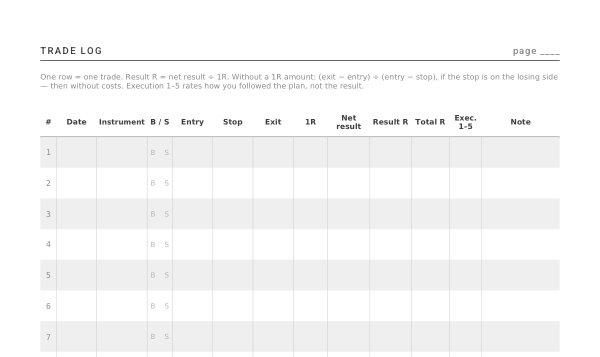
Empty rows break nothing: the formulas skip them without errors. Three example trades sit on a separate “Example” sheet.
1R is the amount you lose if price reaches your stop. Result in R = net result ÷ 1R. With 1R = $200, a $392 profit is +1.96 R; a $124 loss with 1R = $100 is −1.24 R.
Without a 1R amount, the sheet uses prices: (exit − entry) ÷ (entry − stop), if the stop is on the losing side. That leaves out costs, so enter the net result and 1R when you can. Our online journal calculates R the same way.
Step by step: What is 1R and how to calculate expectancy in trading.
Both are free. They differ in how much work stays with you and where your data lives.
| Excel spreadsheet | Online journal | |
|---|---|---|
| Entering trades | by hand, row by row | by hand, from an MT4/MT5 report, or automatically via a free MT4/MT5 add-on |
| Statistics | 13 measures from the sheet | the same plus a 90% interval for the average, the odds of your losing streak and drawdown in random orders |
| Control | full: your own columns and formulas | fixed layout, with a strategy plan and an assistant |
| Data | in your file | in your browser, no account |
| Phone | in a spreadsheet app | in the browser, offline too |
The spreadsheet gives full control, but you copy every trade by hand. The online journal pulls trades from MT4/MT5 and shows at once: edge or luck.
The PDF pages come from our 136-page paper journal: strategy plans with a decision rule, 100 trade pages, a checkpoint every 20 trades, and tables of losing streaks, drawdowns and sample size.
Yes. It uses only functions that Excel and Google Sheets share, such as COUNTIF and IFERROR. Upload the file to Google Drive and open it in Sheets.
Without a stop there is no R: the row drops out of the statistics and shows up under “Rows without a result in R”. You can enter your planned loss as 1R, but that is an intention, not an order: the market will not stop there.
Below 20, no number tells you anything. With an average of +0.2 R and a standard deviation (the typical spread of results) of 1.5 R, you need about 225 trades: (2 × 1.5 ÷ 0.2)². The calculator on this site works it out from your R column.
For record-keeping and education, not financial advice.